13 min read
Every Failure in This Terraform Pipeline Was Silent
Building a VCS-driven Terraform workflow on HCP Terraform with OIDC dynamic credentials and OPA policies across two peered VPCs — where five separate things reported success while doing nothing at all.
Quick navigation#
- Overview
- What I built
- Why dynamic credentials change the shape of things
- Silent failure 1: the workspace that swallowed its first push
- Silent failure 2: a trigger pattern that matched nothing
- Silent failure 3: the pull request that produced no plan
- Silent failure 4: a policy that checked nothing
- Silent failure 5: a policy that could not compile
- Run triggers are not a dependency scheduler
- Deleting a workspace does not delete the infrastructure
- Lessons learned
Overview#
I migrated a two-VPC AWS peering lab from "run terraform apply by hand in seven folders" to a VCS-driven workflow on HCP Terraform: a pull request produces a speculative plan, a merge to main applies it, and AWS authentication happens through OIDC with no stored credentials anywhere.
The infrastructure part went fine. 116 resources, two peered VPCs, eight instances, cross-VPC ping at 0% packet loss.
The interesting part was that nearly everything that went wrong went wrong quietly. Not a stack trace, not a red X — a green check, an empty result, a run that simply never appeared. Five separate times I had a component that reported success while doing nothing at all, and in every case the broken state looked almost exactly like the working one.
That's the thread worth writing down, because loud failures teach you about the thing that broke. Silent ones teach you about how you verify.
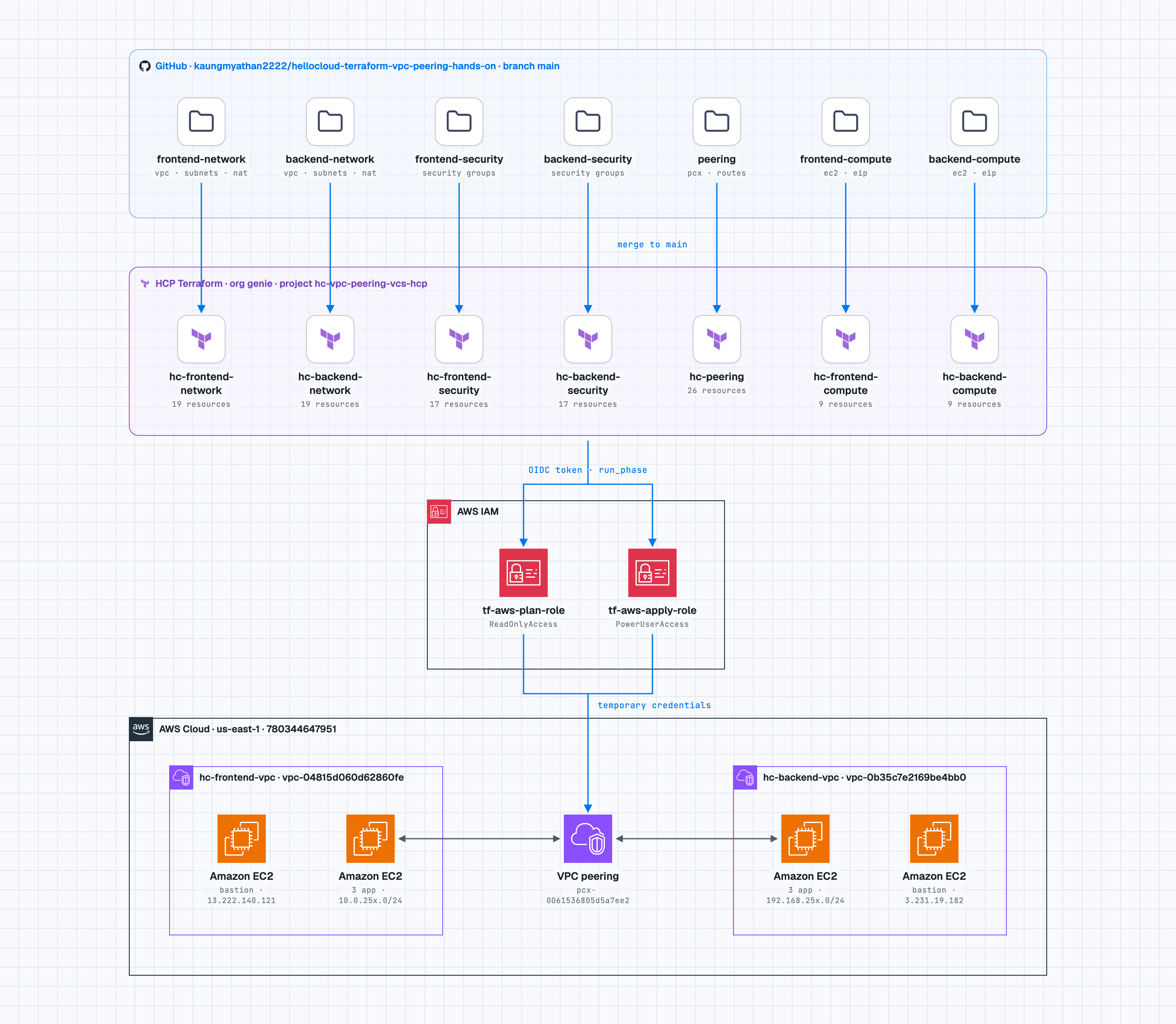
One repo, seven workspaces, one folder each. AWS access via OIDC with separate plan and apply roles.
What I built#
Two mirrored VPCs in us-east-1, peered, with the routing deliberately narrow:
hc-frontend-vpc  10.0.0.0/16        hc-backend-vpc  192.168.0.0/16
  public  -01/-02/-03  -> IGW         public  -01/-02/-03  -> IGW
  private -01          -> NAT         private -01          -> NAT
  private -02/-03      -> peer only   private -02/-03      -> peer only
                    \                /
                     VPC peering connection
                     4 routes, /24 to /24
The peering connection carries exactly four routes — same-ordinal /24 to /24, never a blanket /16. private-02 can reach the peer's private-02 and nothing else. The public and NAT-routed tables carry no peer route at all, which gives you a built-in negative control: ping the peer's private-01 from private-02 and it must fail.
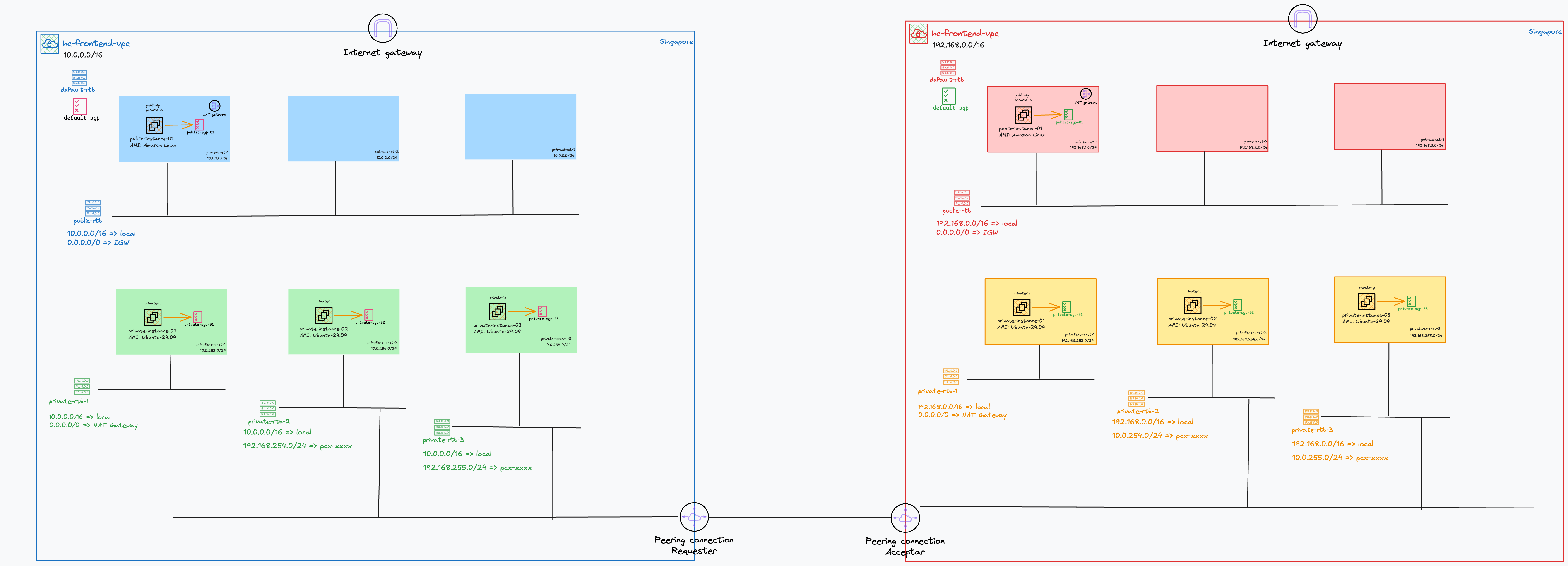
The topology I was aiming at, including what each route table carries.
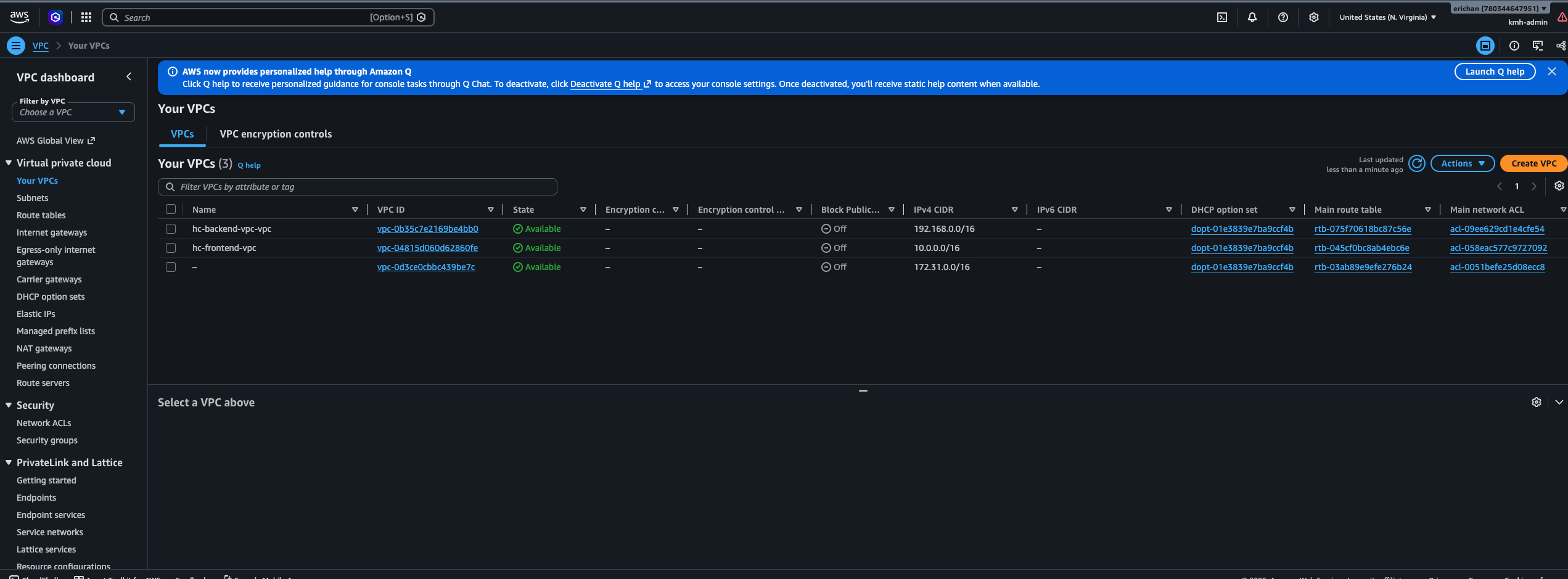
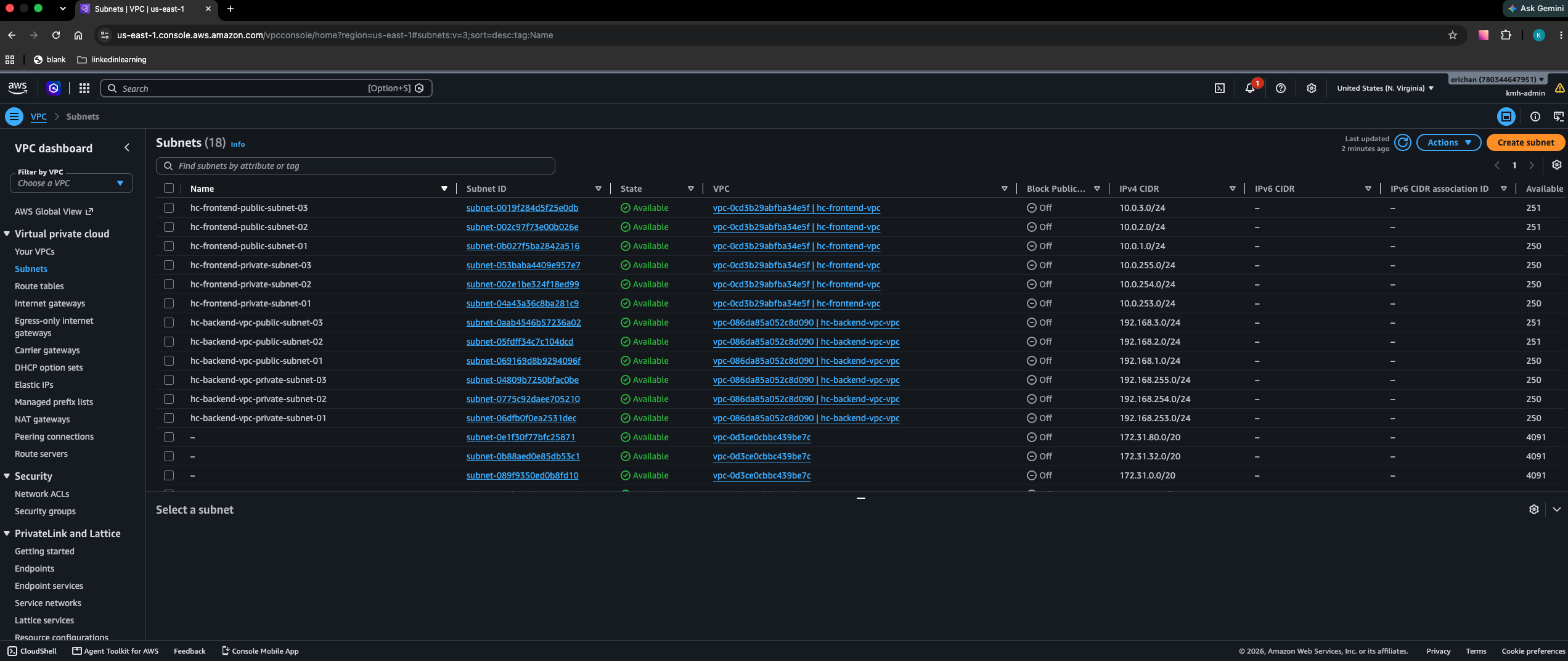
Same-ordinal CIDRs on both sides: 10.0.25x.0/24 mirrors 192.168.25x.0/24.
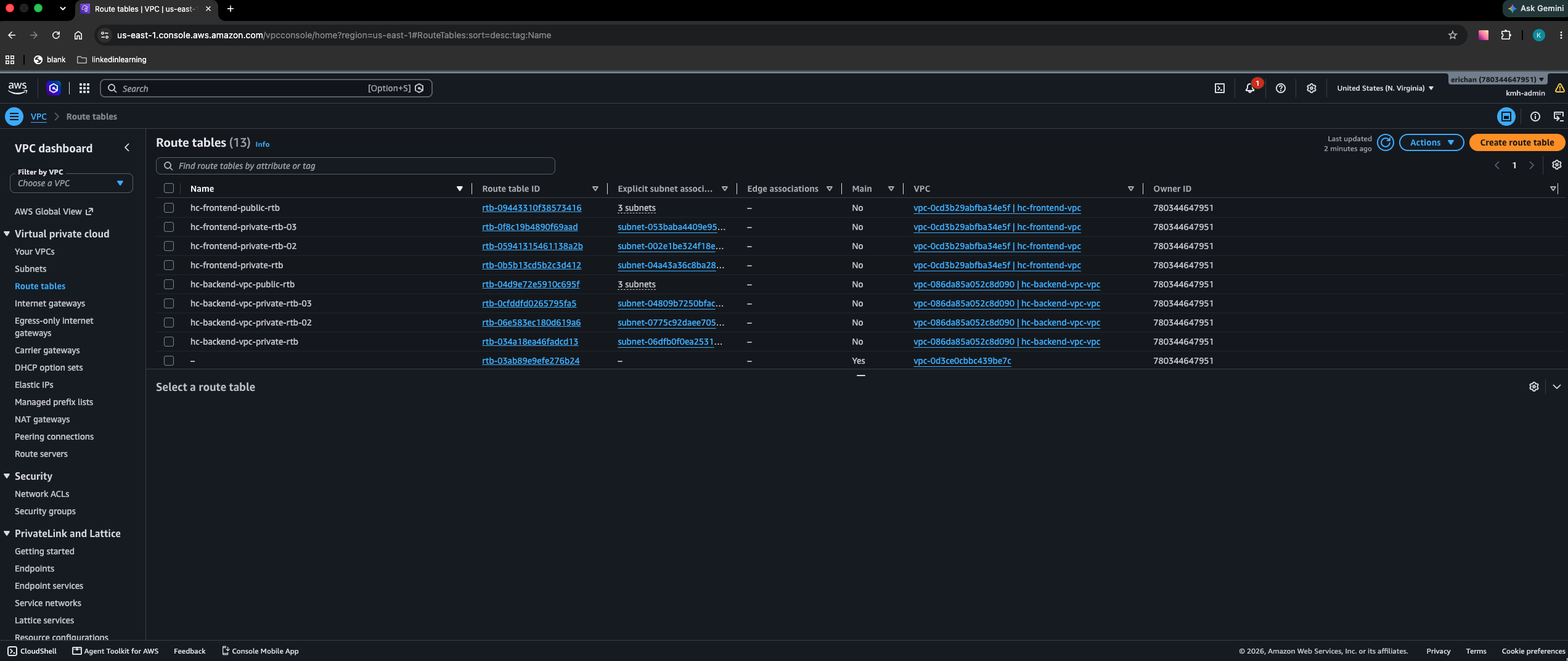
The narrow routing, made concrete. The -02/-03 tables have a single peer /24 and no default route at all — the only way out is through the peering connection.
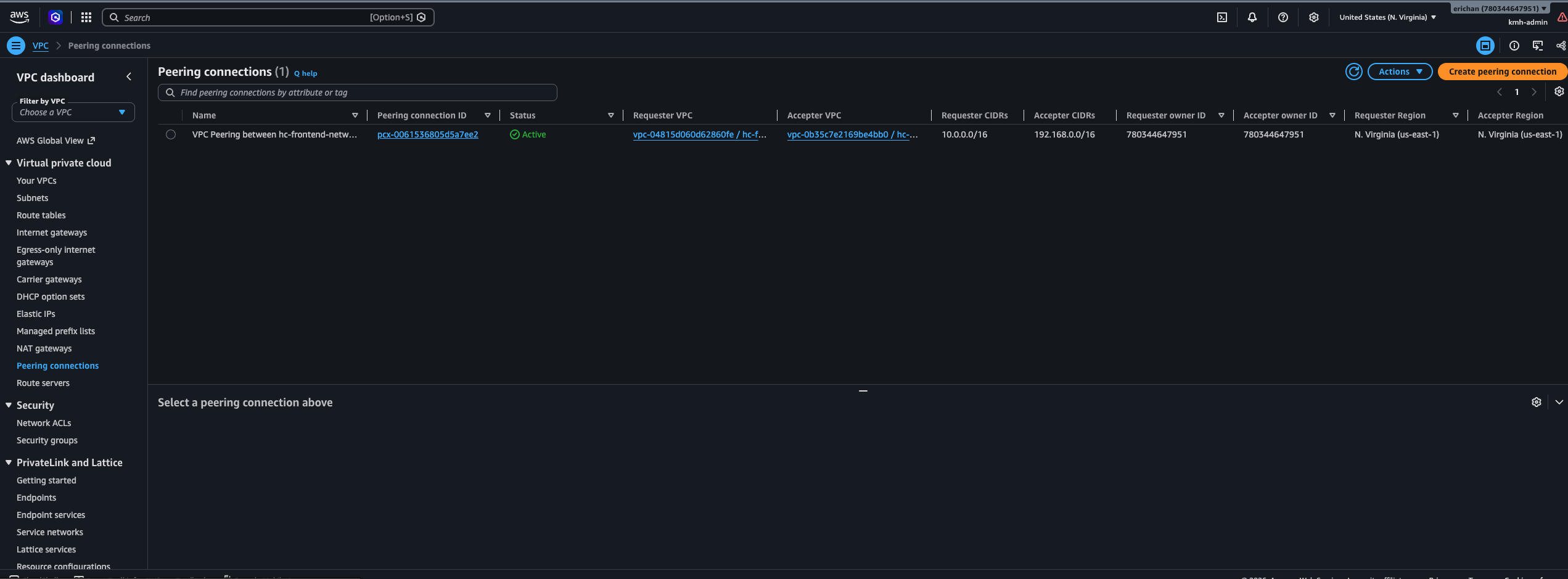
The Terraform is split across seven HCP Terraform workspaces, one per folder in a single repo:
| Workspace | Directory | Resources |
|---|---|---|
hc-frontend-network | frontend-network/ | 19 |
hc-backend-network | backend-network/ | 19 |
hc-frontend-security | frontend-security/ | 17 |
hc-backend-security | backend-security/ | 17 |
hc-peering | peering/ | 26 |
hc-frontend-compute | frontend-compute/ | 9 |
hc-backend-compute | backend-compute/ | 9 |
Cross-stack reads go through terraform_remote_state against producer outputs only.
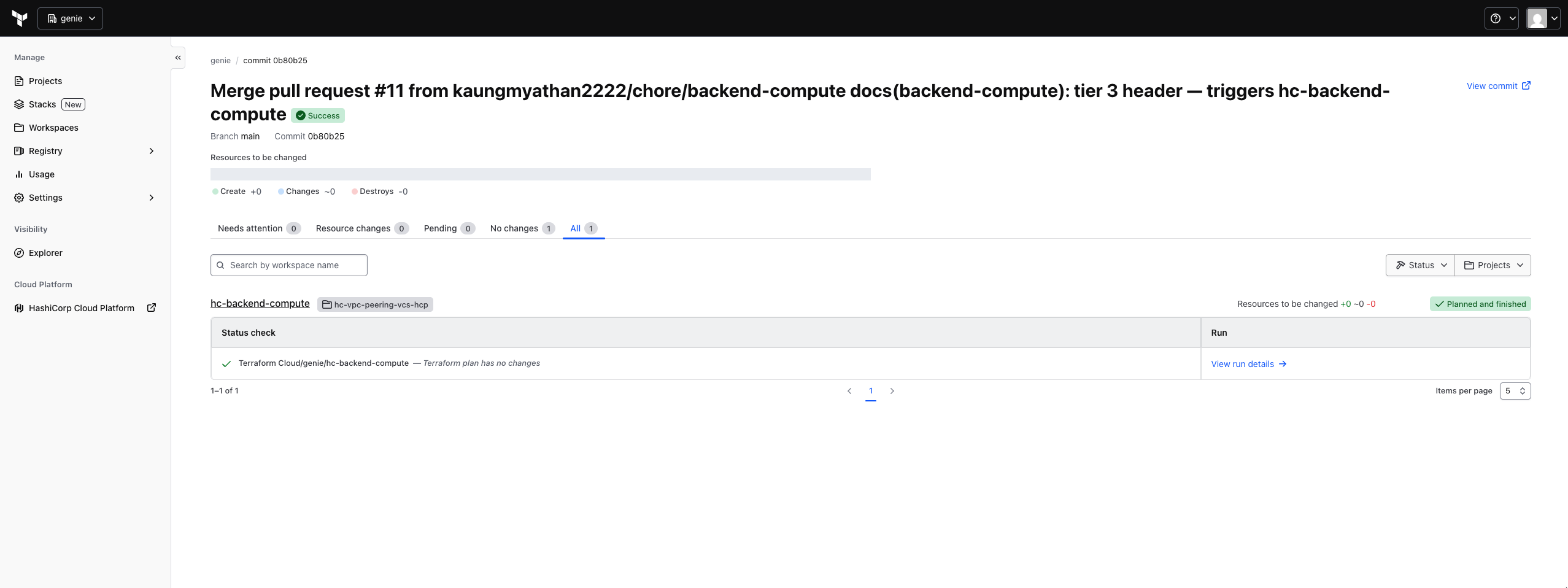
A merge touching one folder plans one workspace. The other six stay silent.
One rule shaped the whole split: no workspace reads its mirror twin. All the cross-VPC security group rules live in the peering stack rather than in either security stack, which is what lets both security stacks apply from empty with no ordering between them.
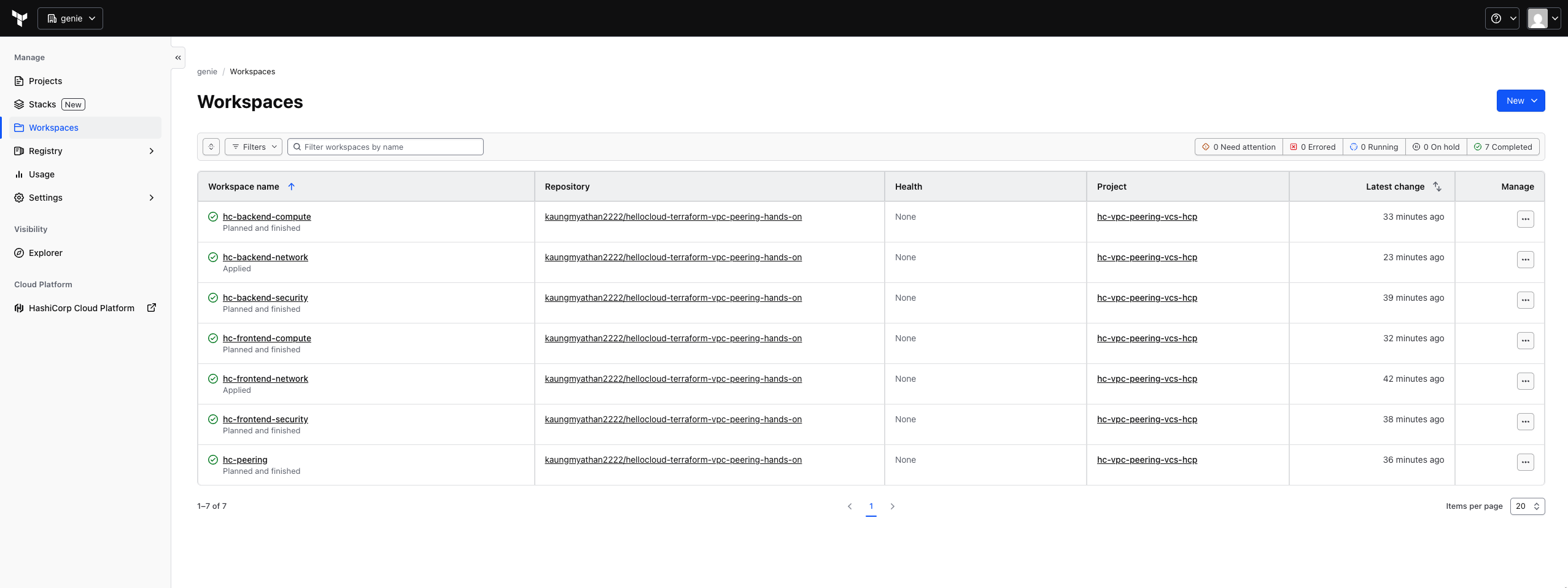
After a full build in tier order. Each workspace is scoped to one folder.
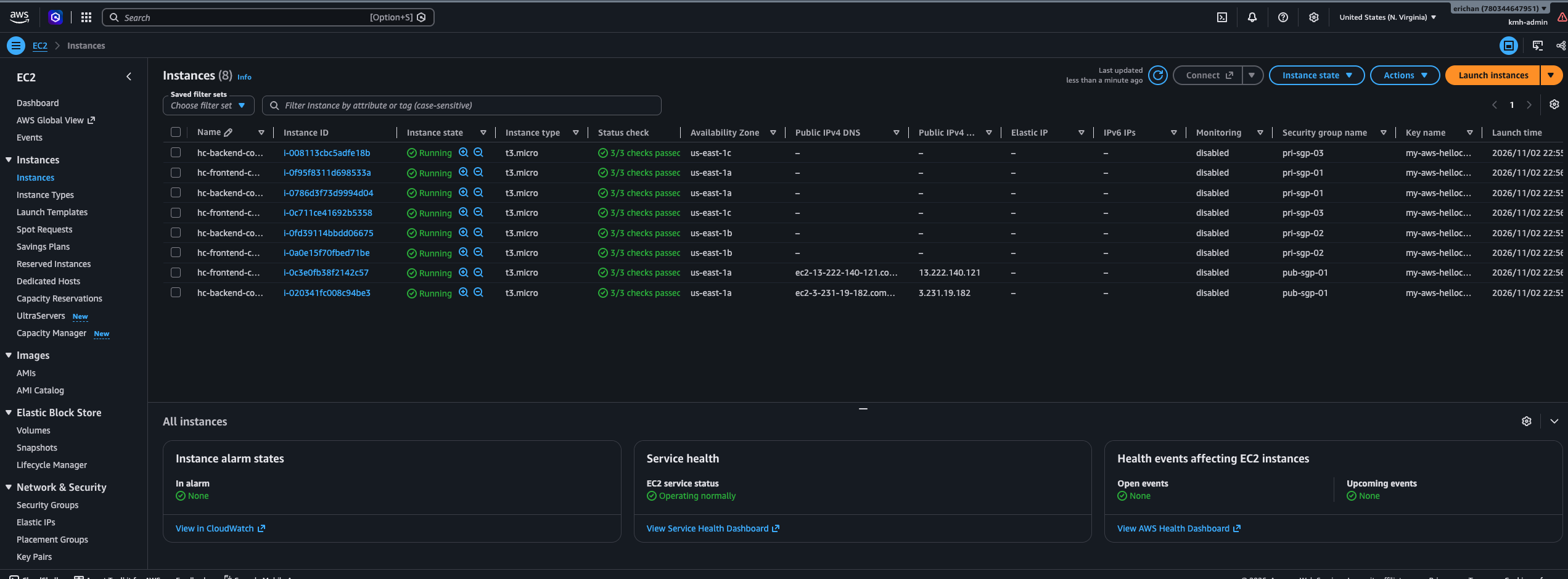
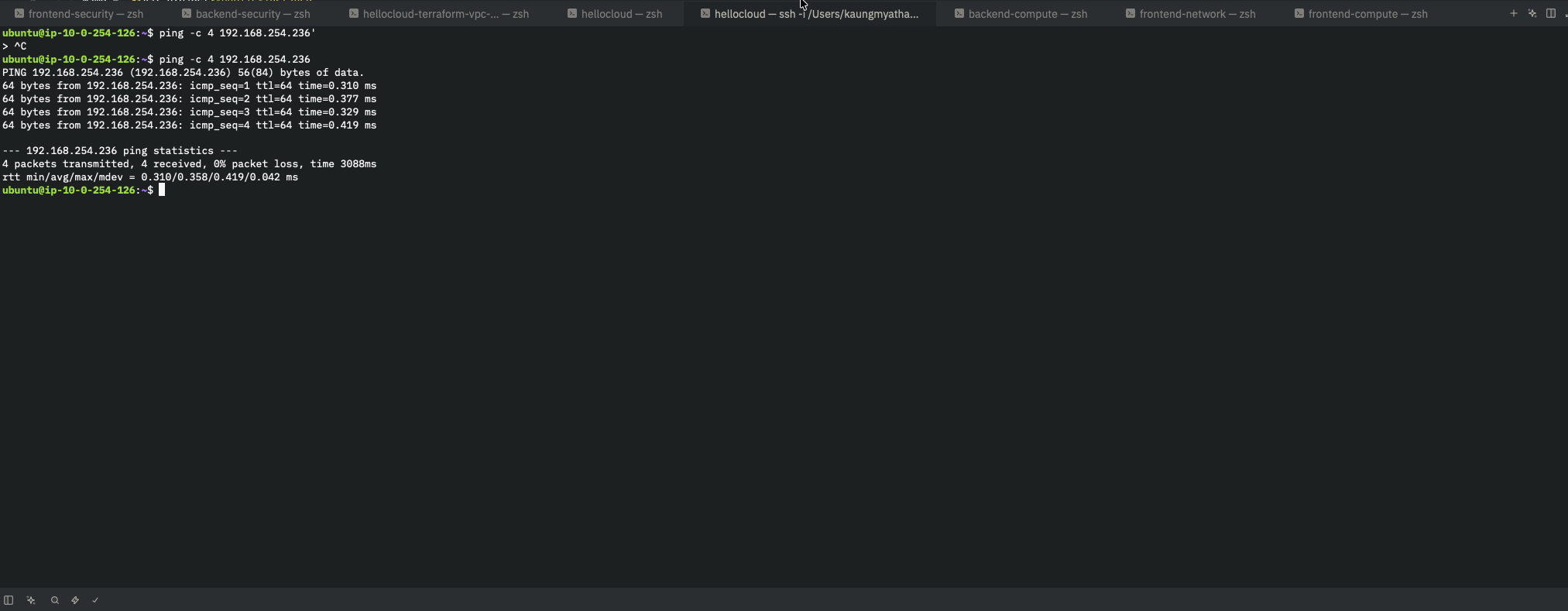
The proof that matters: 0% loss to the peer's same-ordinal subnet, and 100% loss to the one with no peer route.
Why dynamic credentials change the shape of things#
There are no AWS keys in this setup. Not in state, not in a workspace variable, not in a CI secret. Every workspace authenticates through OIDC: HCP Terraform presents a signed token, AWS trusts the issuer, and STS returns credentials that expire with the run.
The part I found genuinely useful is that the trust policy can distinguish the plan phase from the apply phase:
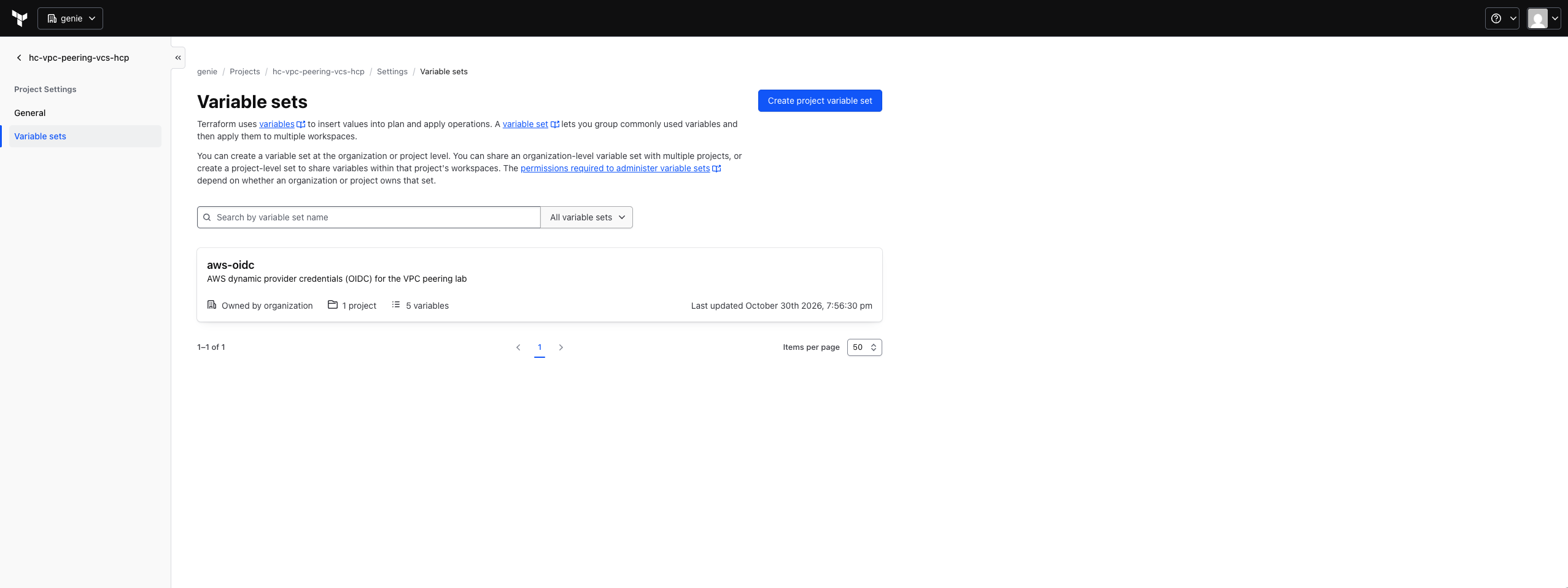
Scoped to the project, so a new workspace inherits AWS access with no variables of its own.
organization:genie:project:hc-vpc-peering-vcs-hcp:workspace:*:run_phase:plan   -> ReadOnlyAccess
organization:genie:project:hc-vpc-peering-vcs-hcp:workspace:*:run_phase:apply  -> PowerUserAccess
A plan assumes a role that holds ReadOnlyAccess. It isn't that plans are expected not to modify infrastructure — they physically cannot, because the credentials they run with have no write permissions. That's a meaningfully stronger guarantee than a convention.
Two details that matter:
StringLike rather than StringEquals is what makes the workspace:* wildcard match, so one role pair covers all seven workspaces. And because the variable set holding the TFC_AWS_* values is scoped to the project, a new workspace inherits AWS access simply by being created in the right place. Zero per-workspace configuration.
The sharp edge is in that same string. The project name is baked into the subject claim, so a workspace created in the wrong project fails twice over — no variables, and a subject that matches no trust policy. I did exactly that by running terraform init without pinning project in the cloud block, which silently created the workspace in the org's default project. The fix is one line that should have been there from the start:
cloud {
  organization = "genie"
  workspaces {
    project = "hc-vpc-peering-vcs-hcp"
    name    = "hc-frontend-network"
  }
}
Silent failure 1: the workspace that swallowed its first push#
I connected a workspace to GitHub, pushed a change to its folder, and nothing happened. Pushed again. Nothing. Opened a pull request, merged it. Still nothing.
The API told a confusing story. Configuration versions were piling up:
configuration-versions: status "uploaded", changed-files ["backend-network/outputs.tf"]
runs: count 0
HCP had received the webhook, fetched the repo, identified exactly which files changed — and queued no run. That symptom is indistinguishable from a broken webhook, and I spent a while diagnosing the wrong thing because of it.
The cause is queue_all_runs, which defaults to false. When it's false, runs triggered by a webhook are not queued until at least one run has been queued manually. A brand-new workspace swallows its first push by design — the reasoning being that a freshly created workspace usually has no variables or credentials yet, so firing a plan the instant someone pushes would be noise at best.
One manual run satisfies the gate permanently.
This turned out to be convenient rather than annoying, because the first build has to be ordered by hand anyway. Starting each workspace's first run in dependency order both builds the stack and arms the workspace for every future merge.
Silent failure 2: a trigger pattern that matched nothing#
Having fixed that, I set trigger patterns on each workspace so a change in one folder only plans that folder. I used the obvious form:
frontend-network/
Merged a PR touching frontend-network/main.tf. No run.
The configuration version was created, at the right commit, on the right branch, non-speculative — everything short of actually running. Trigger patterns are globs matched against changed file paths, and frontend-network/ contains no wildcard, so it matches that literal string and nothing else. The changed path was frontend-network/main.tf. Not equal. Zero files matched. No run queued.
The documented form needs the wildcards and a leading slash:
/frontend-network/*
/frontend-network/**/*
There's a simpler option I'd take next time: leave trigger patterns empty. With file triggers enabled and a working directory set, HCP triggers on changes under that directory automatically. An empty pattern can't be malformed.
Silent failure 3: the pull request that produced no plan#
The whole point of this workflow is that a PR shows you a plan before you merge. Mine never did — and I didn't notice for seven pull requests, because I merged each one straight away and the merge did trigger a run.
When I finally opened a PR deliberately expecting a plan, I got nothing, and the API showed zero speculative runs across all seven workspaces, ever.
The workspace settings looked correct:
speculative-enabled:   true
file-triggers-enabled: true
trigger-patterns:      ["/frontend-security/*", "/frontend-security/**/*"]
branch:                main
HCP was receiving the PR events — configuration versions existed for the PR head, tagged with the pull request number. They just came back speculative: false, and no plan-only run was ever queued.
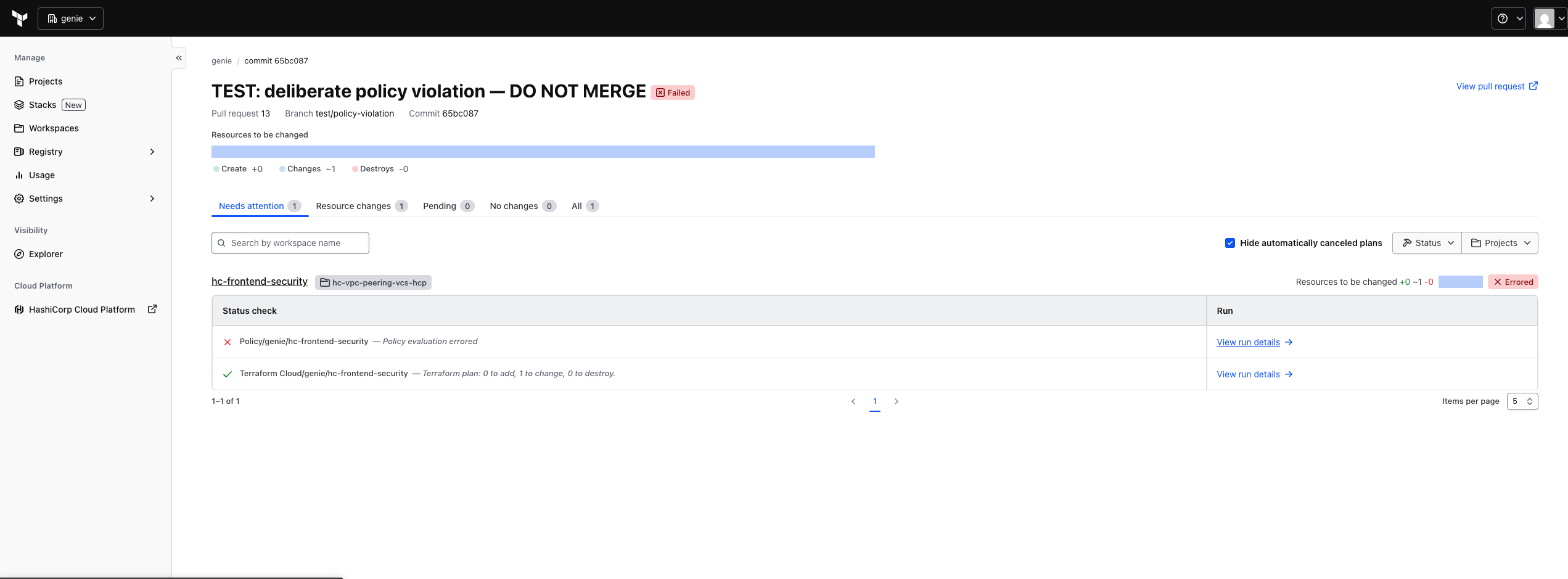
Once speculative plans were enabled, the PR finally produced one — and surfaced the next problem.
The cause: speculative-enabled in the API is not the same flag as "Automatic speculative plans" in the workspace's VCS settings. One governs whether the workspace accepts speculative plans; the other governs whether the VCS integration creates them. The API reported true the entire time while the feature was off.
This one is worth internalising beyond the specific setting. I was verifying through the API because it's precise and scriptable, and the API gave me a true value for a flag that wasn't the one I cared about. Precision isn't the same as relevance.
Silent failure 4: a policy that checked nothing#
With the pipeline working, I added an OPA policy to block security groups open to the world. I started from HashiCorp's documented example:
deny[msg] {
  r := plan.resource_changes[_]
  r.type == "aws_security_group"
  r.change.after.ingress[_].cidr_blocks[_] == "0.0.0.0/0"
  msg := sprintf("%v has 0.0.0.0/0 as allowed ingress", [r.address])
}
Clean pass on my code. Which was true, but for entirely the wrong reason.
That example inspects inline ingress blocks on aws_security_group. My repo declares none — all 18 ingress rules are standalone aws_vpc_security_group_ingress_rule resources, which is the current recommended form. So the policy iterated over security groups, looked for an array that is always empty, and found nothing.
Not "your code is secure." Just "I found nothing to look at." Identical output.
The fix is to check all three forms, so a refactor between them can't bypass the policy:
deny contains msg if {
  r := plan.resource_changes[_]
  changed(r)
  r.type == "aws_vpc_security_group_ingress_rule"
  r.change.after.cidr_ipv4 == "0.0.0.0/0"
  msg := sprintf("%v allows ingress from 0.0.0.0/0", [r.address])
}
I hit the same class of bug twice more while testing. A rule that uses referenced_security_group_id has cidr_ipv4: null, so a naive CIDR check flagged three legitimate rules as "opens SSH to null". And an SSH rule scoped by cidr_ipv6 passed every check I had, because I'd only written the v4 case — a /64 open to the world, invisible.
Both were found by running the policy against a real plan JSON pulled from an actual run, not by reading the Rego. I now keep plan fixtures in the repo and evaluate against them with the OPA CLI before uploading anything.
One Rego detail worth knowing, because it causes exactly this kind of quiet pass: a missing key is undefined, not null, and undefined fails a rule body silently. Real Terraform plans emit every attribute, hand-written fixtures often don't. object.get(a, "key", null) handles both; a.key == null does not.
Silent failure 5: a policy that could not compile#
Last one, and my favourite.
I uploaded the corrected policy, opened a PR with SSH deliberately open to 0.0.0.0/0, and watched the speculative plan run. The policy check failed — but not on the violation:
Mandatory failures: No policies to display

bundle .../hc-vpc-peering: 9 errors occurred:
  deny-public-ingress.rego:5: rego_parse_error: `if` keyword is required before function body
  deny-public-ingress.rego:9: rego_parse_error: `contains` keyword is required for partial set rules
HCP's policy runner is OPA v1.x, which requires Rego v1 syntax (deny contains msg if { ... }). HashiCorp's own published example is still Rego v0 (deny[msg] { ... }). Their docs are stale relative to their runtime, and I'd copied the docs.
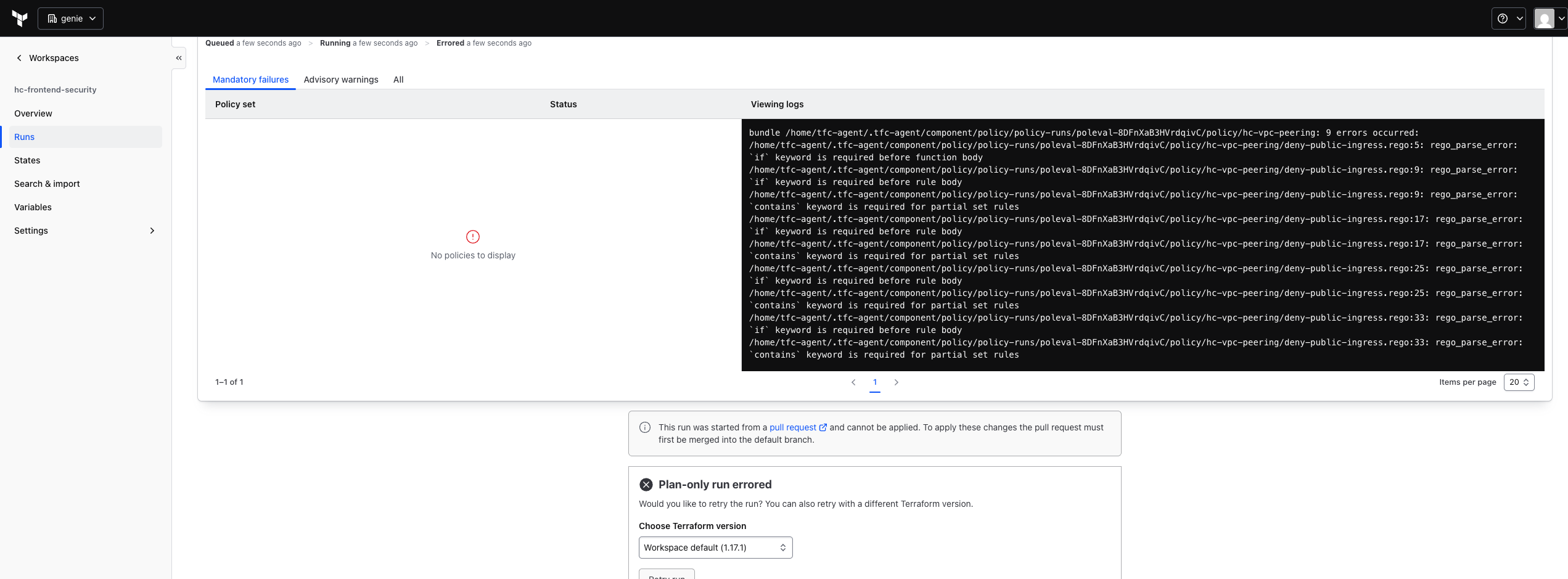
"No policies to display" — while the plan under evaluation contained cidr_ipv4 = "0.0.0.0/0".
Worse, I'd been validating locally with opa check --v0-compatible, which suppressed precisely the errors the runtime would raise. My local OPA was version 1.22 and defaults to v1 — it had been telling me the truth until I told it not to.
The thing to take from this isn't the syntax version. It's that a policy which cannot compile enforces nothing. The plan contained cidr_ipv4 = "0.0.0.0/0", the run reported "No policies to display", and nothing blocked. A parse error is not a failing policy, it's an absent one — and on a dashboard it looks far closer to "clean" than to "broken".
Run triggers are not a dependency scheduler#
Not a silent failure, this one was loud — but it's the design mistake I'd most want to warn someone about.
Since compute reads network's outputs, I wired run triggers between the workspaces so that applying one would re-plan its consumers. Ten edges, derived from the dependency graph.
They produced failed runs on four separate occasions.
A run trigger fires one hop, on apply, with no notion of waiting for the rest of the graph. So on a cold start, network applied and immediately queued compute — before security had written any state. Compute failed with Unable to find remote state. Then security applied, queued compute again, and that run succeeded. Eventually correct, never ordered.
Trimming to direct edges helps but doesn't fix join nodes: the peering stack reads four upstreams, so whichever finishes last wins the race regardless.
I deleted all ten and merge pull requests in dependency order instead — networks, then security, then peering and compute. Four merges in sequence, nothing to misconfigure.
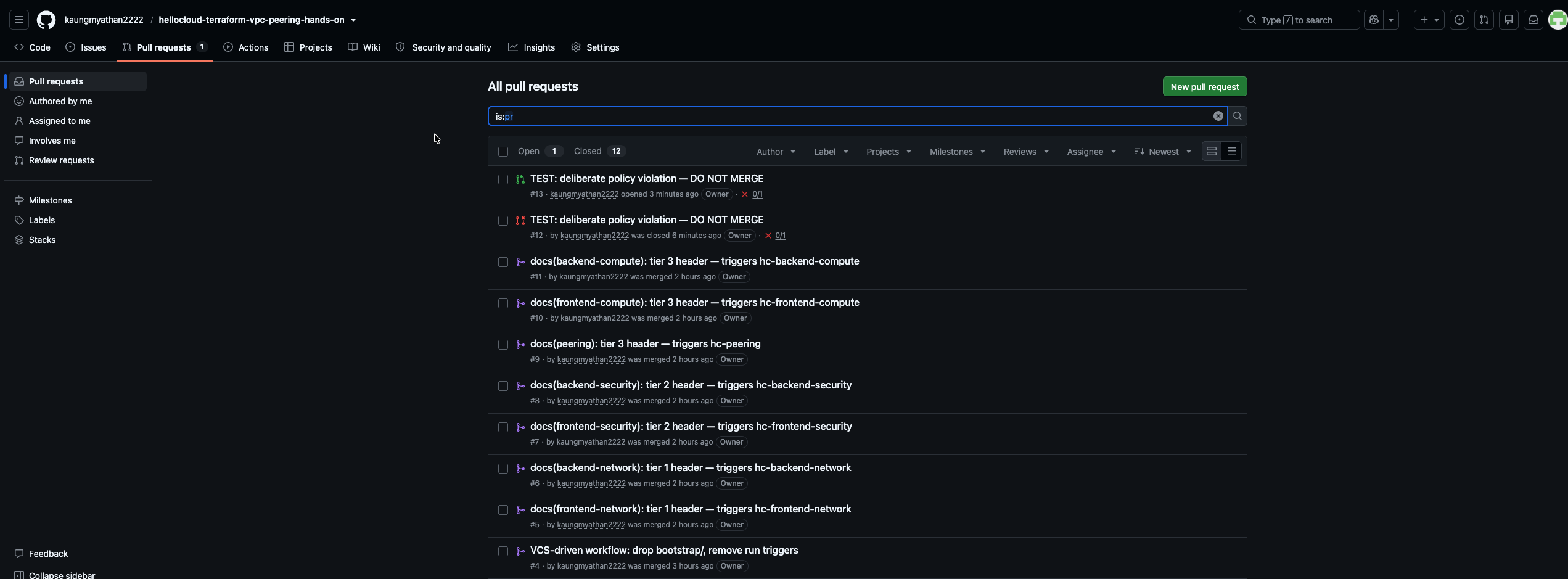
Ordering by merge rather than by trigger graph. Every change went through a pull request.
The distinction worth keeping: remote state sharing lets one workspace read another's outputs. A run trigger makes it re-plan. They look like the same feature and they solve different problems; you usually want the first without the second.
Deleting a workspace does not delete the infrastructure#
Mid-migration I deleted two workspaces to recreate them cleanly.
That deleted their state. It did not delete the 38 AWS resources that state was tracking — two VPCs, two NAT gateways, subnets, route tables, all of it still running and still billing, now with nothing in Terraform aware they existed.
There's no undo. Recovery is importing them back or deleting them by hand, which means enumerating everything in dependency order: NAT gateways, then release the EIPs, detach and delete the internet gateways, subnets, non-main route tables, and finally the VPCs.
The teardown order is just the build order reversed, and it's worth writing down before you need it:
fe/be compute -> peering -> fe/be security -> fe/be network
Delete the workspaces themselves last, and only after each reports zero resources.
Lessons learned#
Make it fail before you trust it to pass. Every bug in this post produced output indistinguishable from success. The only reliable check was constructing the violation, watching it get caught, and then reverting. A policy — or a trigger, or a webhook — that you have only ever seen succeed is indistinguishable from one that does nothing.
Test against real data, not fixtures you wrote. My hand-written test cases encoded the same assumptions as my policy, so they agreed with each other and both were wrong. Pulling an actual plan JSON from a real run found two bugs in minutes.
An API flag that reads true is not proof the feature is on. speculative-enabled: true was accurate and irrelevant. Check behaviour, not configuration.
Prefer settings that cannot be malformed. An empty trigger pattern can't have a typo. A working directory you can verify against ls can't silently point at nothing. Given a choice between a configuration that's expressive and one that's hard to get wrong, the second one is worth a lot.
Vendor docs can lag vendor runtimes. The OPA example I copied was a major version behind the engine that runs it. When something fails at a syntax level, check what version the platform actually runs before assuming you typed it wrong.